Get help with Download and install
Installation for individuals
View your product license information
Most single-user subscriptions are tied to a customer's Autodesk ID and don't use serial numbers. However, if you do have a product license with a serial number, you can find information about the license type and associated serial numbers, either in Autodesk account or within a running product.
Find license information in Autodesk account
You can monitor current license information for each of your Autodesk products in Autodesk account.
Sign in to your account at manage.autodesk.com.
Under All Products and Services, find your product.
In the product tile, click View Details.
If you see License Details on the product details page, click it to display your serial numbers and product keys.
If you don’t see License Details on your product details page, you don’t have a serial number.
Find license information within 2017 and later products
Start your software.
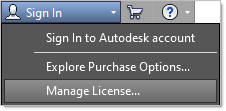
From your account sign in icon, click Manage License.
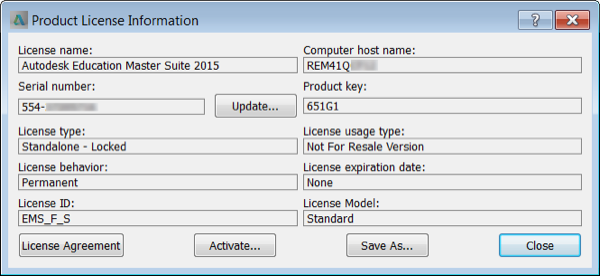
View your license information.
Find license information within 2016 and earlier products
Start your software.
Click Help > About, or About [Product Name].
In the About window, click Product Information or Product License Information.
Related resources
Need help? Ask the Autodesk Assistant!
The Assistant can help you find answers or contact an agent.
What level of support do you have?
Different subscription plans provide distinct categories of support. Find out the level of support for your plan.
View levels of support